
In the relentless pursuit of a competitive edge, gamers tirelessly upgrade their PCs, monitors, and mice. But often, the most significant untapped potential lies right under our left hand: the keyboard. What if you could replace the sprawling, inefficient layout of a standard keyboard with a tool designed exclusively for gaming dominance and unparalleled comfort?
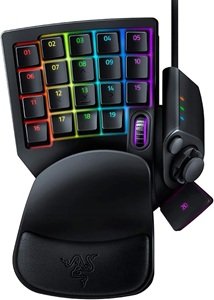
Enter the Razer Tartarus Pro, a device that isn’t just a peripheral but a dedicated command center. This isn’t a simple accessory; for many, it’s a fundamental upgrade to how they interact with their games. Let’s explore why this unique keypad has become a secret weapon for pro gamers and enthusiasts alike.
What Exactly is a Gaming Keypad?
Before we dive into the specifics of the Tartarus Pro, let’s address the core concept. A gaming keypad is a compact, ergonomic device that typically replaces the left half of your keyboard. It consolidates movement keys, essential actions, and macros into a single, optimally positioned unit. The goal is to place every critical command within effortless reach of your fingers, eliminating the need to stretch, search, or fumble during high-stakes moments.
The Razer Tartarus Pro: Features That Redefine Control
The Tartarus Pro sits at the pinnacle of this category, thanks to a suite of innovative features that set it apart from both traditional keyboards and other keypads.
1. Razer Analog Optical Switches: The Game-Changer
This is the Tartarus Pro’s flagship technology and its most significant advantage. Unlike standard mechanical switches that have a single, binary actuation point (on or off), these analog optical switches are revolutionary.
- How They Work: They use a beam of light to register key presses, allowing them to detect the distance the key is pressed. This enables you to program two different actions on a single key: one for a shallow press and another for a full press.
- Practical Applications: In a first-person shooter like Call of Duty or Apex Legends, you could set a shallow press on “W” to walk quietly for stealthy maneuvers, while a full press engages a full sprint. In a simulation game like Microsoft Flight Simulator, this allows for precise throttle control. This analog input, once exclusive to console controllers, brings a new dimension of precision to PC gaming.
2. Unmatched Ergonomics for Marathon Sessions
Comfort is directly linked to performance, especially during long gaming sessions. The Tartarus Pro is engineered for wellness as much as it is for winning.
- Adjustable Palm Rest: The magnetic, plush leatherette wrist rest can be set to three different heights. This ensures your hand maintains a natural, neutral posture, drastically reducing strain on your wrist and forearm.
- Optimal Hand Positioning: By moving from a flat keyboard to the Tartarus Pro’s angled design, your hand, wrist, and forearm align in a straight, relaxed line. This ergonomic benefit is a primary reason many users report a significant reduction in fatigue and discomfort.
3. Deep Customization with Razer Synapse
Hardware is nothing without powerful software. Razer’s Synapse platform unlocks the full potential of the Tartarus Pro.
- 32 Programmable Inputs: Every key, the 8-way directional thumbpad, and the scroll wheel can be remapped to any key, complex macro, or command.
- Hypershift Mode: This brilliant feature effectively doubles your available commands. By holding a designated Hypershift key, every other button on the keypad can perform a secondary function. This means you have an entire second keypad at your fingertips without needing to move your hand.
- Cloud-Based Profiles: Your custom configurations are saved to the cloud. Whether you’re switching between World of Warcraft, Valorant, and Photoshop, Synapse can automatically load the perfect profile for each application.
4. The Mecha-Membrane Sensation
Razer has masterfully blended two technologies. The keypress offers the crisp, tactile feedback of a mechanical switch, giving you that satisfying confirmation of an input. However, the bottom-out feeling is soft and quiet, thanks to an integrated membrane. The result is a responsive yet surprisingly quiet and comfortable typing experience.
Who is the Razer Tartarus Pro For?
This keypad is a specialized tool that delivers immense value to specific audiences.
- MMO & MOBA Players: Manage sprawling action bars with ease. The thumbpad is perfect for ability cycling, map pinging, or character movement.
- FPS Gamers: Gain lightning-fast access to grenades, melee, equipment, and movement tech. The analog optical switches offer a tangible movement advantage.
- Content Creators & Professionals: Streamline your workflow in applications like Adobe Premiere, Blender, or OBS. Program complex keyboard shortcuts and macros onto a single, ergonomic device.
- Gamers with Ergonomics Concerns: If you experience wrist pain or fatigue, the Tartarus Pro’s design can be a game-changing solution for both comfort and performance.
The Verdict
The Razer Tartarus Pro is more than just a piece of gaming gear; it’s an investment in your performance, comfort, and efficiency. While it requires a short adaptation period to build new muscle memory, the long-term benefits are profound.
It delivers a unique combination of analog control, deep customization, and ergonomic design that a traditional keyboard simply cannot match. For the serious gamer or power user looking to min-max their setup, the Tartarus Pro isn’t just an option—it’s a definitive upgrade.
If the button doesn’t work, please refresh the page.